
Table of Contents
Picture a scale house supervisor opening the old system on a Monday morning and finding a few hundred tickets that never closed. Some trucks were weighed in and never weighed out, some loads were paid but never marked paid, and one customer appears three times under three spellings. The old system tolerated all of it, so nobody had to deal with it.
A system move removes that tolerance. A new ERP expects each ticket to have a status, each balance to tie back to something, and each customer to exist once. The data you bring across decides how the first month feels, and it also decides how long the project takes.
Our year-end physical inventory post covered getting your counts ready before count day. This post applies the same discipline to a system move: the records to settle before you sign an ERP contract, and the work you can finish in Q4 while you wait for a Q1 go-live. It also answers a common question about open tickets: do they come across to the new system, and what happens to the ones still in process?
Settle these records before you sign because the scope of the data load is part of what you are agreeing to. On Thursday, our post on signing in Q4 and going live in Q1 picks up the timeline from here.
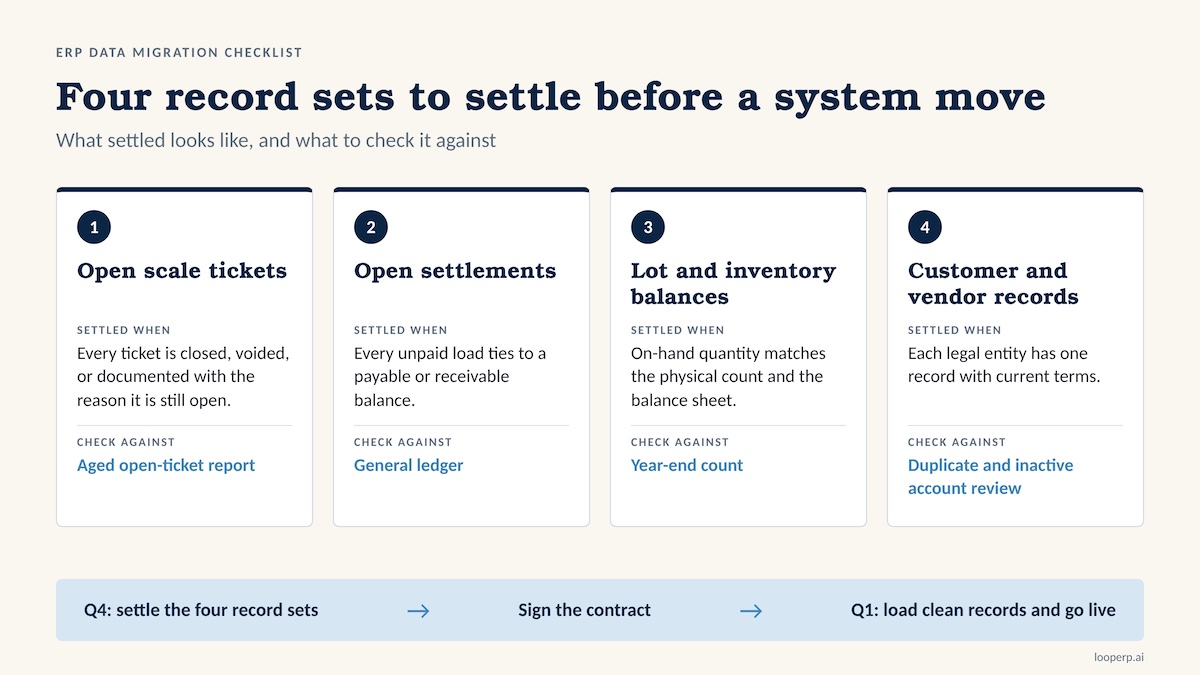
Open scale tickets: close what you can, document the rest
An open ticket is any ticket without a final status: an inbound load weighed in but never weighed out, a ticket waiting on a grade or a regrade, a ticket with no price attached, or an outbound load that shipped but never invoiced. These are the records that cause the most confusion in a cutover, because a new system has no memory of the story behind them.
Start with an aged open-ticket report sorted oldest first. Tickets that are months old are usually dead: duplicates, test weighings, or loads that were voided on paper and never in the system. Void them with a note. Tickets that are real but unfinished need an owner and a decision, either finish them in the old system before cutover or carry them across as in-process records.
For the ones you carry across, write down the fields a new system will need before anyone asks: ticket number, date, customer or supplier, material and grade, gross, tare and net weight, price basis, and the reason the ticket is still open. Keep the original ticket number as a reference even if the new system assigns its own, so a driver or a customer calling about a load can still be matched.
Then set a freeze rule. Pick the date after which no new tickets are created in the old system, and decide in advance what happens to a truck that is on the scale at that moment. Writing the rule down takes ten minutes and saves an argument at 6 a.m. on cutover day.
Open settlements: tie every unpaid load to a balance
A settlement is open when material has been received but the supplier has not been paid in full, or when a customer has been billed and the cash has not arrived. In scrap, many settlements also stay open on purpose: a price-pending load waiting on a fixed price, a regrade adjustment that lands after the first payment, or a netting arrangement between a supplier who is also a customer.
Build one open-settlements schedule as of your cutoff date. List each open item with its ticket, party, amount, age, and the reason it is open, then tie the total to the payable and receivable balances in your general ledger. If the schedule and the ledger disagree, find out why now. A difference that nobody can explain in the old system becomes a much harder question in the new one.
Separate the open items into three groups. Items you can pay, bill, or write off before cutover should be cleared. Items waiting on a price or a regrade need a documented trigger, so the person who opens the new system knows what event closes them. Everything else carries across with its original dates intact.
Cutoff timing matters here. A go-live at the start of a fiscal period lets you close the books in the old system and bring over clean opening balances. A go-live in the middle of a month asks your finance team to split a period across two systems.
Lot and inventory balances: reconcile before you load
If you followed the year-end physical inventory steps, you already hold the best input for this section: a count that you trust. Compare it to what the system says is on hand, by material and by yard, and to the inventory value on your balance sheet. Three numbers that agree are a clean opening balance. Three numbers that disagree are a project.
Look for the usual trouble spots: negative on-hand balances, lots with no cost, lots with no remaining quantity that are still marked active, material codes that mean the same thing under two names, and piles that were blended or split without a record. Each one needs a decision before load, because a new system will either reject the record or accept it and carry the error forward.
The larger choice is how lots come across. You can load one opening balance per material, which is simple but erases the trail back to the supplier and the date received. Or you can load balances by lot, which keeps that trail and takes more preparation. If your customers, auditors, or environmental reporting depend on knowing where material came from, material lot tracking is worth protecting through the move. A good inventory management system should let you bring lot, location, and cost across together; ask any vendor to show you how that works with your own data before you sign.
Customer and vendor records: one party, one record
Your customer and vendor lists grow by habit. A driver gives a slightly different business name, a clerk creates a new account instead of searching for the old one, and a supplier changes ownership but keeps trading. After a few years you have duplicates, accounts that have not been used in ages, and records with missing tax or payment details.
Start by merging duplicates so each legal entity has one record, with one set of terms. Archive inactive accounts using a rule you choose and write down, such as no activity in the last 24 months, so the decision is consistent and someone can defend it later. Standardize naming (for example, a single format for company names and addresses) because a new system will search and report on those fields.
Check the fields that carry compliance and payment weight: tax IDs and W-9 forms, supplier identification and any licensing or documentation your state requires for purchases, payment terms, price agreements, and remit-to details. Confirm any bank detail changes with a phone call to a number you already had on file. A migration is a busy moment, and a changed remit-to address is a favorite tool of payment fraud.
Finally, decide who owns each list. Master data goes stale quickly when it belongs to no one.
What to finish in Q4 while you wait for a Q1 go-live
None of this work requires a signed contract, and all of it shortens the road once you have one. If you are still mapping out how long an implementation takes, our post on choosing a recycling ERP before Q4 and a 90-day implementation timeline lays out the sequence. Clean data keeps the early weeks of that sequence short.
Use the weeks between now and go-live for this checklist:
- Run an aged open-ticket report and void or finish everything older than your cutoff
- Reconcile on-hand inventory to the general ledger and to your year-end count
- Build the open-settlements schedule as of your last day in the old system and tie it to payables and receivables
- Merge duplicate customers and vendors, and archive inactive accounts by a written rule
- Standardize material and grade codes so one material has one name
- Name one owner each for tickets, settlements, inventory, and master data
- Write the freeze rule: the cutover date, and what is allowed after it
- Save a read-only export of ticket history and year-end balances outside the old system
- Ask each vendor you are considering for its data load template, and fill one out with real records as a dry run
The last item is easy to skip. A dry run with your own tickets and balances shows you the gaps while you still have time to fix them, and it shows you how each vendor handles the cases that matter to you.
ERP Data Migration FAQ
Do open scale tickets migrate to a new ERP?
They can, and the cleaner path is to close as many as possible in the old system first. Carry across only the tickets that are truly in process, with their original ticket numbers, weights, grades, and the reason they are open. What a vendor can import depends on its system, so ask for the answer in writing and test it with a sample of your own tickets.
How much history should we move?
Many operators bring open items plus a limited history, often the current and prior year, and keep older records in a read-only archive. Your auditors, your customers, and any environmental reporting you owe decide the minimum. Settle that question before you sign, because it affects the size of the data load.
Can we keep operating while we migrate?
Yes. You run the old system until the cutover date, then follow your freeze rule. The work in this post happens in parallel with daily operations, which is why starting in Q4 helps.
Should we wait for a signed contract to start cleaning data?
No. Voiding dead tickets, merging duplicate accounts, and reconciling inventory improve your reporting in the old system and make any vendor's quote and timeline firmer.
Who should own the cleanup?
Give each data set to one person who knows it well: the scale house lead for tickets, accounting for settlements, the yard or inventory manager for lots and balances, and whoever maintains accounts for customer and vendor records. A project lead tracks all four and makes the calls when two owners disagree.
What does a lot-level opening balance require?
For each lot you need the material, quantity, location, cost, and received date or source. The more lots you load as individual records, the more preparation you need, and the more traceability you keep.
Start with the records you can see today
Open tickets, open settlements, lot balances, and customer and vendor records are four places where a migration can stall, and you can work on all four now. Finish them in Q4 and you arrive at a Q1 go-live with a shorter list of surprises. For a full picture of what a scrap-specific system covers, see our Scrap ERP guide.
Book a demo and bring a sample of your open tickets to see how they would move into Loop ERP.