

Table of Contents
The scale house is where a materials business becomes measurable. A truck arrives, material gets weighed, the load is classified, and a ticket records what happened. From there, it may move through dispatch, processing, shipment, and invoicing or settlement.
Scale house software is designed to manage that first operational moment quickly and accurately. The important question for a growing operation is what happens after the ticket is created. Does the information continue into dispatch, inventory, and accounting, or does someone export it, re-key it, and reconcile it later?
What scale house software actually does
An inbound ticket may include:
- Supplier, customer, or walk-in seller
- Vehicle, trailer, and driver information
- Material type and grade
- Gross, tare, and net weights
- Quality observations or deductions
- Photos, documents, and other load evidence
- Time, location, and scale operator
An outbound ticket captures similar information for a shipment leaving the yard. It may also connect the load to a sales order, customer, destination, carrier, and shipping instructions.
Step one: inbound ticketing records the receipt
Inbound ticketing starts with the physical receipt of material. A purchase contract may define the commercial terms, and a purchase order may authorize a specific release. The inbound ticket records what actually arrived.
That difference matters because the final value of a load may depend on actual weight, grade, quality, freight, moisture, or other deductions. The ticket is the operational evidence that later supports a settlement with the supplier.
For example, a truck may arrive under a contract for a broad material category. At the scale, the operator records the actual net weight and an initial grade. An inspector may add a contamination deduction, or a later review may reclassify the load. If the ticket is only a static record, each later change requires a separate process to keep the commercial and financial records aligned. In a connected workflow, the ticket carries those details into inventory and settlement.
Step two: dispatch turns tickets into planned work
Ticketing records what happened. Dispatch helps the operation plan what needs to happen next.
Inbound dispatch can organize expected pickups, scheduled deliveries, suppliers, carriers, and receiving locations. Outbound dispatch can coordinate customer orders, available inventory, carriers, destinations, and loading windows. For a multi-yard business, dispatch also determines which location is receiving or shipping the material and which team owns the work.
The relationship between dispatch and ticketing is straightforward:
- A job or load is planned in dispatch.
- The vehicle arrives and the scale operator finds the expected movement.
- The scale creates or completes the ticket against that movement.
- The actual weight, grade, and other details replace the estimate where needed.
- The completed transaction becomes available to the next operational and financial step.
Some scale house tools record the ticket well but provide little support for the work before or after it. Dispatch, inventory, and accounting may each live elsewhere. That arrangement becomes harder to manage as loads, sites, and contracts multiply.
Step three: invoicing and settlement complete the transaction
On the sales side, an outbound ticket usually supports fulfillment and invoicing. The ticket confirms what shipped, in what quantity, and to which customer. That information can trigger the inventory movement, customer invoice, and revenue recognition that follow.
On the purchasing side, the comparable financial step is often a supplier settlement. The business may owe the supplier based on the final weight, grade, quality deductions, freight, and agreed pricing. The settlement reconciles the provisional value at intake with the final amount payable.
These steps turn operational facts into financial facts. If the invoice is based on a different quantity than the ticket, someone has to find the reason. If a regrade changes the value of material after receipt, inventory and payable records need to reflect it.
The cleanest process keeps the chain intact:
Inbound: purchase contract, purchase order, inbound dispatch, inbound ticket, settlement.
Outbound: sales contract, sales order, outbound dispatch, outbound ticket, fulfillment, invoice, settlement.
Where a scale point solution stops
A scale house point solution can capture weights, print tickets, manage scale activity, and send records to another system. The boundary becomes a problem when the business expects it to answer questions it was never designed to answer.
Questions such as these reach beyond the ticket:
- What is the real landed cost of this material after freight and deductions?
- Which inventory lots are still available, and what is their current value?
- Did this shipment reduce inventory and recognize the right cost of goods sold?
- Which supplier settlements are waiting on a quality review?
- What margin did this contract produce across multiple loads?
- Are all locations using the same customer, vendor, item, and accounting records?
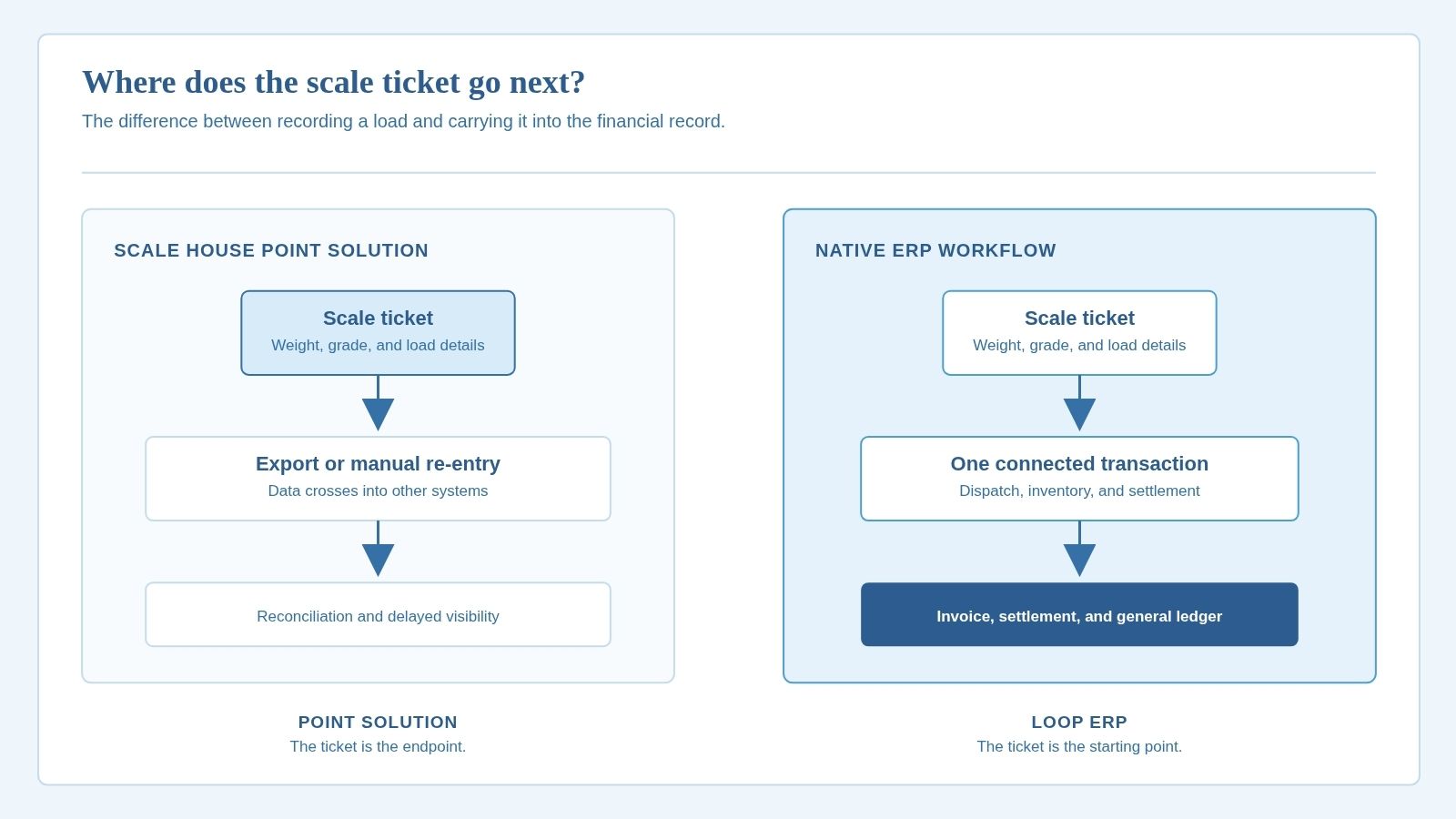
When the systems are separate, the usual workaround is an export, import, or manual re-entry. That creates a financial handoff and can delay inventory valuation and month-end reconciliation.
What native NetSuite integration changes
Loop ERP takes a different approach because it is built natively inside Oracle NetSuite. The scale house application gives operators a focused interface for the work at the scale, while the underlying transaction lives in the same ERP environment as inventory, purchasing, sales, and finance.
The ticket does not end its useful life when it is printed. An inbound receipt can post inventory against an inventory received not billed account until the vendor bill or settlement is completed. An outbound fulfillment can reduce inventory and recognize cost of goods sold, while invoicing recognizes revenue and accounts receivable.
The benefit is a shorter chain between an operational action and its financial record. The same load identity, quantity, material, and location support both the operational workflow and the accounting entry.
For operators evaluating a scrap ERP, ask whether the scale house is an isolated application that sends data to the ERP, or the front end of a transaction that already lives in the ERP.
How to compare systems during evaluation
Start with a real load, not a feature checklist. Ask the vendor to show the path from scheduled inbound movement to ticket, inventory receipt, final pricing, and supplier settlement. Then run the outbound version through dispatch, ticket, fulfillment, and invoice. Look for:
One transaction history. Can you trace every later step back to the original ticket without searching across multiple databases?
Clear ownership of changes. If a weight, grade, or price changes, does the system show who changed it and how the change affected the transaction?
Financial behavior. Can the vendor explain which accounting entries happen at receipt, fulfillment, invoicing, and settlement?
Usable roles. Can scale operators, inspectors, dispatchers, and finance work from views relevant to their jobs?
Scale house software should make the scale house faster. For a growing materials business, it also needs to preserve each ticket as the load moves through dispatch, inventory, settlement, and the general ledger. That gives operators and finance the same record of what happened.
If your current scale system stops at the ticket, the next question is where the financial handoff happens and how much work it creates. Loop ERP connects scale house workflows with NetSuite financials so the transaction can continue from the yard to the books without a separate reconciliation process.
Move beyond ticket capture and connect the full workflow. Talk with Loop ERP to see how scale house ticketing, dispatch, inventory, settlements, and NetSuite financials can work in one system without exports, re-entry, or month-end reconciliation.
FAQ
What is scale house software?
Scale house software records vehicle movements at an inbound or outbound scale. It typically captures account, vehicle, material, gross weight, tare weight, net weight, quality details, and documentation.
Is scale house software the same as an ERP?
No. Scale house software focuses on weighing and ticketing. An ERP connects those operational events to purchasing, sales, inventory, dispatch, settlements, invoicing, and the general ledger. Some products cover both through a shared platform, while others exchange data between separate systems.
What is the difference between ticketing and dispatch?
Dispatch plans and coordinates an expected pickup, delivery, or shipment. Ticketing records what actually arrived or left, including the final weight and material details. A connected workflow ties the planned movement to the actual ticket.
Why does native NetSuite integration matter?
Native integration means operational transactions and financial records live in the same NetSuite environment, rather than being synchronized through a connector or manual export. That helps inventory, invoicing, settlements, and financial reporting reflect the same load data.